Valve Index
Tutorials
YouTube Videos
Index Magcup Setup EN

Index MagCups Setup
Hello, fellow gamer!
If you are reading this, you got your hands on the Index MagCups, for your GunStock (MagTube, ForceTube) or Joystick (ProTas).
This is the new version. You just have to clip/unclip it, instead of restrictive manipulations with ZipTie.
We invite you to join our Discord community for any questions or directly contact us through our support service on our website.
 Installing your Index MagCups should take 3 minutes.
For video setup, you can check our YouTube Playlists.
Feel the game!
Parts list
________________________________________________________________________________________________________________________________________________
| Bag N°4 | Rest of the Box | ||
 |
 |
 |
|
| X1 |
X1 |
X1 | |
| Hex Key 0,4cm | Hex Key 0,25cm | Pair of Index MagCups (left and right) | |
Mounting
________________________________________________________________________________________________________________________________________________
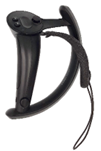
Remove the controller’s Straps by pressing the spring button.
________________________________________________________________________________________________________________________________________________
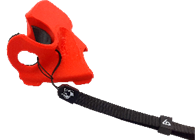
Optional but recommended – You can add a wrist straps. Just make sure to put the wrist strap’s sling between the plastic part and the rubber part.
________________________________________________________________________________________________________________________________________________
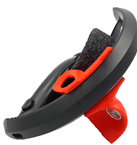
Put the MagCup on the rounded part of the controller. Make sure to lay the back part first (magnet side) and then clip the front part with the two little bumps (spring button side).
________________________________________________________________________________________________________________________________________________
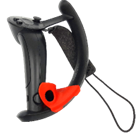
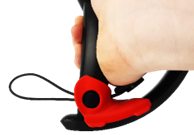
Slide the MagCup to the hole and align it with the spring button. Put back the string of the hand strap by pressing the spring button.
________________________________________________________________________________________________________________________________________________
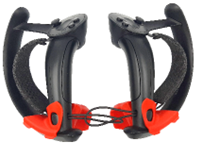
Your Valve Index MagCup is now ready to use. Do this with the other cup. Enjoy your games with your Index Magcups.
We recommend you to keep the MagCups on the controllers at all time. They should not bother you when you don’t need them.
Removing
________________________________________________________________________________________________________________________________________________
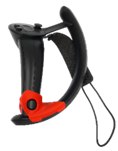
Remove the controller’s Straps.
________________________________________________________________________________________________________________________________________________
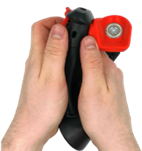
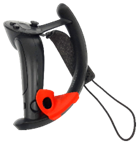
Push on the two sides of the MagCup to slide it on the round part of the controller. Make sure to push out the sides enough, otherwise you may scratch your controllers.
________________________________________________________________________________________________________________________________________________
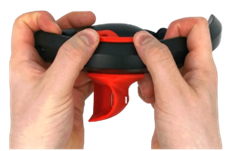
Unclip the MagCup by pushing on the two little bumps.
________________________________________________________________________________________________________________________________________________
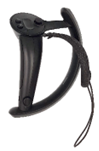
Put back the string of the controller’s hand strap by pushing the spring button.
Index Tracking Fix EN
INTRODUCTION
________________________________________________________________________________________________________________________________________________
The Knuckles Fix section of the companion app is in a pre-alpha state, and only compatible with users who are running both the Valve Index headset and controllers (formerly known as Knuckles during their dev kit days).
This documentation will serve to help assist everyone, including those outside of the above requirements to use the companion app fix.
The tips, tricks, suggestions, and information herein are the culmination of years of progress in the subject. If you would like to directly see the progress yourself, and perhaps some newfound information, feel free to check out the #index-trackingfix-pre-alpha channel of our Discord server, and the pinned messages.
Lastly, a disclaimer:
The primary cause for these tracking issues is poor quality assurance from Valve in addition to an issue in Lighthouse tracking that has been well documented since 2016, but never fixed.
Only a very small percentage of index controllers’ customers encounter this issue, and of those an even smaller percentage are unable to improve their tracking after we assist them through support.
While the tips, tricks, suggestions, and information will aim to help mitigate the issues as much as possible, ultimately, they will fall short of replacing controllers with new ones until they don't have the tracking issues.
Tracking, even with all of these tips etc. will never be perfect if your controllers are bad.
IDENTIFYING YOUR PROBLEM
________________________________________________________________________________________________________________________________________________
Because the cause is poor quality assurance from Valve + software tracking problems, everyone who experiences tracking loss, experiences it in different, and sometimes, unique ways.
Your first priority is to identify the characteristics of yours, to then be able to proceed with ways to mitigate it.
So, before we get started, here is a checklist so that you are starting with a neutral baseline for troubleshooting purposes:
- For starters, go through this Steam Support Page Valve has made for Valve Index Lighthouse Base station tracking. Some of the following items on the checklist will appear to repeat what is on the support page, with some alterations factoring in our gunstock: https://help.steampowered.com/en/faqs/view/1af1-670b-ff5c-3323
- Eliminate potential reflections. Reflective surfaces disrupt tracking. Things such as chrome tubes on your gunstock, mirrors, some displays, the magnetic faceplate on the front of the Valve Index, etc. If your gunstock tubes are chrome, cover them up somehow to prevent the reflections off the chrome tubes from interfering with tracking.
- Sunlight interferes with Lighthouse tracking. If there are windows in your play space, make sure they are covered (by blinds etc.) when using VR.
- Make sure both controllers when attached to the gunstock, and your headset are clearly visible by all of your Lighthouse base stations without any occlusion. If a Lighthouse cannot see a controller, it tries to predict where it is, causing tracking issues.
- SteamVR Chaperone. If you have this set to be invisible until you are close to the edge of your play space, set the trigger distance to be as close to the edge of your play space as possible. Because of how SteamVR renders Chaperone, there is a distinct increase in frame time (aka FPS drop) for the few seconds it takes for Chaperone to appear and disappear. As you can imagine, if you are regularly near the edge of your play space, you will experience unplayable performance. During the process of SteamVR rendering Chaperone, or having Chaperone disappear, you will experience significant tracking issues.
- Make sure your game performance is stable. In a similar vein to Chaperone, performance issues cause tracking issues. Make sure whatever game you are playing runs fine at the refresh rate you set for your headset. Things you can do to help reduce frame time, outside of the obvious things such as reducing graphics settings, include:
a) Disabling Lighthouse Bluetooth in SteamVR settings.
b) Reducing refresh rate and resolution of your PC displays if above 1080p 60hz.
c) Closing any other programs or software running that aren't necessary for VR (such as browsers, etc.).
d) Setting the priority of both SteamVR & the games in question to Above Normal or High in Task Manager.
e) In Power Management settings set your PC power plan to High Performance or if available, Ultimate Performance. Within the power plan, disable USB selective suspend.
Now that you have established a neutral baseline, onto the troubleshooting to help identify the trigger points for your tracking issues:
When do you lose tracking?
- Is it while your controllers are on the MagTube/ForceTube/ProVolver gunstock?
- Making sure both controllers when attached to the gunstock and your HMD are visible to all Lighthouse base stations, try slowly rotating in a circle while aiming down the sight of the gun in the game. Is tracking consistently good or bad? Does it improve or get worse at certain points? Is it just one or both controllers? Make note of these and where it occurs if it does.
- Is it while you are attaching/detaching a controller? It can take some practice to get in the rhythm of how to move the controller to attach and detach from the gunstock. If enough force is used it can cause tracking issues, especially when attaching to the gunstock. Try to consciously be as light as possible when attaching and detaching, and see if anything regarding your tracking changes.
- Is it when firing (ForceTube users primarily)?
- Is it just one or both controllers causing it?
- Tracking test. Follow the steps in this video. Great for Valve RMA should you go that route: https://youtu.be/T9ueES_xml8
MITIGATING YOUR PROBLEM
________________________________________________________________________________________________________________________________________________
Now that you have gone through some basic troubleshooting to better identify the source of the issues, here are some mitigation tips you can try. Others have experienced varying degrees of improvements with these, and again keeping in mind an individual's issues are different from others, so what might work for someone else, may not work for you and vice versa:
- Tracking loss when both controllers are on the gunstock
Try rearranging or adjusting your Lighthouse Base stations. For example, if they are diagonal in the corners of your play space, try having both on one wall in each corner, facing the center of your play space.
In this configuration, you will need to play only facing both base stations, and not turning around.
If tracking improves, you may want to consider buying additional base stations to completely cover your play space.
- Tracking loss when attaching or detaching from the gunstock.
In addition to being lighter during the process of attaching and detaching, you can weaken the strength of the connection of the magnets, to reduce tracking loss. For example, a customer used circular adhesive bumper pads attached to the magnet on their controller cup to solve the issue.

- Tracking loss when firing (ForceTube/ProVolver).
For this issue we will be using the Companion App, please refer to Haptic Setup documentation for all use surrounding it. There are two sections in particular we will be using.
Knuckles Fix (Index HMD only):
Disclaimer: This alone will likely not solve your issue; you will need to also follow Native Game Customization.
Following the Haptic Setup, install the Knuckles Fix and enable it in SteamVR. Then enable it in the Companion App. On the Knuckles fix page of the Companion App (visible by clicking on Show advanced settings) you will see these options:
- Accelero max value (G): This sets a threshold (shown in Gs aka Gravitational Force Equivalent) above which SteamVR will filter out Accelerometer data when enabled. The lower it is set, the more regular VR behavior will lose tracking.
Set too low, you lose tracking altogether.
Start by setting this to around 6.5 - Freeze Duration after kick (ms): This freezes the position of your controllers where they were last tracked, immediately after ForceTube or ProVolver kicks from firing a gun.
The duration is set in milliseconds.
Set this to 0 if you want it disabled.
Start by setting this to around 40 if you want it on.
Native Game Customization (all headsets):
For this, the options will first be broken down, and then the process of what to do to adjust them for your needs explained.
On the Native Game Customization Tab of the Companion App you will see these options:
- Native kick power multiplier (%) & Native rumble power multiplier (%): These adjust the percentage of kick & rumble strength used in game. So, 100% would be 1:1 what is set in the game. Above 100% would be to increase the kick & rumble strength, but only works when the kick & rumble strength used in game isn't already at 100% of what the ForceTube/ProVolver can output. In other words, if a game sets a shotgun to use 100% kick & rumble, and a handgun to use 50% kick & rumble, setting above 100% would only see a difference for the handgun, not the shotgun. Below 100% would reduce the kick & rumble strength used by the game.
- Native rumble duration multiplier (%): This adjusts the duration of rumble used in game. So 100% would be 1:1 what is set in the game. Above 100% would go longer than what is set in the game, and below 100% would go shorter.
- Presets: You can save a preset for a particular game, and then manually load it when playing that game. Just input a name for the preset (such as the game title), and save it. This allows you to have different percentages for each game.
The process:
The overall goal is to reduce the kick and rumble just enough so that you can enjoy the product, while retaining tracking. You can test with any gun in any game. I personally used the M249 in Onward, and tested full auto for the entire drum each time I made adjustments in the companion app. Index users, for these tests, have Knuckles Fix disabled first.
- Start by reducing kick power, rumble power, and rumble duration to 15%
- Fire your weapon in game full auto. Make note of the difference from default.
- If you were able to fire without tracking loss, increase everything. If you were unable to fire without tracking loss decrease everything.
> Index users, if you get tracking loss after decreasing, try enabling Knuckles Fix.
- Save it as a preset and move on to the next game, rinse and repeat.
Note: If you are using the ForceTube Storm you will need to set percentages even lower, because it is significantly stronger than our other haptic devices.
VALVE RMA
________________________________________________________________________________________________________________________________________________
None of the troubleshooting tips to ensure a neutral baseline, or mitigation suggestions were able to allow you to use our products?
If you are within your Valve Index controllers Warranty, you can consider going through an RMA.
Valve is very particular about their RMAs and is a lot less likely to approve one if they think a 3rd party accessory is causing the issue.
For the process of RMA, it is recommended to remove the MagTube cups from your controllers, and follow everything they want you to do without making mention of the MagTube or ForceTube/ProVolver.
To help in the RMA process, go through this video and record one of your own to provide with your RMA ticket: