Tutorials
All the tutorials traditionally found on our website, pertaining to the MagTube gunstock in alphabetical order
- YouTube Videos
- Bipod Setup EN
- MagTube Upgrade EN
- Gunstock MagTube ForceTube Switch Side EN
- Gunstock MagTube ForceTube Setup EN
YouTube Videos
Bipod Setup EN
The Bipod allows you to play VR Shooter games with the stability of a real sniper rifle.
 Upgrading your Gun Stock with the Bipod should take about 1 minute.
________________________________________________________________________________________________________________________________________________


Pull down the screw and unfold the legs.
________________________________________________________________________________________________________________________________________________


Spin the bipod extremities to extend them. (note to Tao: some people get confused on which way to turn it to tighten or loosen)
________________________________________________________________________________________________________________________________________________

Loosen the scroll wheel down to max.
________________________________________________________________________________________________________________________________________________

Push the little lever on the right to open the bipod top. Put the Gun Stock tube inside the bipod.
________________________________________________________________________________________________________________________________________________


The ProTubeVR logo needs to be in front of you when you hold the Gun Stock.
Tighten the scroll wheel to adjust and tie the bipod.
MagTube Upgrade EN
The MagTube allows you to detach the controllers (and its magnetic cups) from the frame without having to take the controllers off the cups, therefore increasing your comfort while playing.
 Upgrading your ProTube to a MagTube should take 10 minutes.
Make sure you work in a clear area and be very careful. Some parts can easily be lost.
PARTS LIST
________________________________________________________________________________________________________________________________________________
| Upgrade Parts | Tools bag | ||||
 |
 |
 |
 |
|
|
| x2 | x1 | x1 | x1 | x1 | |
| Pair of controller holders (cups) | Notched retainer | Smooth Bracket | Hex Key 4mm | Hex Key 2,5mm | |
Step 1: Dismantle the fixed cups
________________________________________________________________________________________________________________________________________________
You need to remove the fix cups on your ProTube using the provided larger Allen key.
Make sure to keep all screws and bolts.
STEP 2: The rear magnetic cup
________________________________________________________________________________________________________________________________________________
    |
||
|
What you need for the rear MagCup (medium tube):
|
||
....................................................................................................................................................................................................................................................................................
 |
 |
| Put the O-ring on the 20mm screw. | Pass the screw and O-ring through the notched magnetic support. |
 |
 |
| Join the notched magnetic support and the T-notched connection and add the second O-ring. | Add the nut and tighten, the magnetic support must be able to move though. |
STEP 3: The front magnetic cup
________________________________________________________________________________________________________________________________________________
 |
||
|
What you need for the front MagCup (longer tube):
|
||
....................................................................................................................................................................................................................................................................................
|
|
| Remove the old smooth 3D printed T-connection from the front longer tube. Replace it with the new magnetic bracket. The magnet must face the other way to the rear magnetic bracket (ex: to the left if you are right-handed). |

________________________________________________________________________________________________________________________________________________
 |
|
You can now install your new magnetic controller holders (cups). Congrats! You now have a complete MagTube. |
Gunstock MagTube ForceTube Switch Side EN
MagTube Rifle, with static stock.
Or
ForceTube Rifle, with haptic recoil stock.
For either of them, you will need to follow the same following steps to change the trigger hand of your gunstock. The images represent a MagTube with static MK1 Stock, but this is the same for a MagTube with MK2 stock or ForceTube with haptic stock.
 Switching the laterality of your MagTube / ForceTube gunstock should take 20 min.
Make sure you work in a clear area and be very careful, some parts can be lost easily.
For steps 1 & 2, if you want to switch from left-handed to right-handed, you just need to flip the way the magnetic supports are mounted.
STEP 1: REAR SIDE / Right to left-handed
________________________________________________________________________________________________________________________________________________
You will need the provided tools (Allen key) to complete this step.
|
|
|
|
| Unscrew the connection on the medium tube closest to the longer tube. |
Remove the screw and bolt (keep them safely as not to lose them). |
Remove the longer tube with the connections. |
|
|
||
|
|
|
|
| By loosening the butterfly screw, slide the magnetic bracket attachment out. |
Flip the magnetic bracket attachment. |
Put it back on the other way like shown. And tighten the butterfly screw to hold it in place (not too much, you may need to adjust it later). |
|
|
|
|
|
|
|
|
| Put the connection back on the tube. |
The screw and bolt as well. |
Tighten the screw but not too much, you will need to adjust the gunstock once you're done. |


STEP 2: FRONT SIDE / Right to left-handed
________________________________________________________________________________________________________________________________________________
|
|
|
|
| By loosening the lower butterfly screw, slide the magnetic bracket attachment out. | Flip the magnetic bracket attachment. |
Put it back on the other way like shown. And tighten the butterfly screw to hold it in place (not too much, you may need to adjust it later). |


STEP 3: ADJUSTMENTS
________________________________________________________________________________________________________________________________________________
|
|
|
|
| Bend all the connections at an angle of 90° so that the MagTube Rifle almost forms a square | Adjust the medium tube with the top of the stock and tighten a bit more the screw. | Adjust the long tube with the rear of the butt and tighten a bit more the screw. |


STEP 4: FINAL TOUCH
________________________________________________________________________________________________________________________________________________
|
You can magnetically attach the cups to the black magnetic supports. Make sure the logo on the cups are facing the front of the Rifle. |
|
|
|
Congratulations! Your MagTube rifle is now on the other side! As a reminder, if you just got it, your MagTube/ForceTube will highly improve your freedom, reaction time, aiming and efficiency after some training. It may take some time to get used to. Thank you for choosing the best Virtual Reality stock rifle solution. But don’t take our word for it, try it. And most importantly, enjoy your games! |

Gunstock MagTube ForceTube Setup EN
You laid your hands on one of our MagTube rifle, with MK1 classic stock or MK2 adjustable stock, or the ForceTube rifle, with haptic recoil stock.
For both, you will use the same following steps to build your gunstock. The images represent an MK1 classic stock, but this is the same for an MK2 asdjustable stock or ForceTube haptic stock.
 Mounting your MagTube / ForceTube gunstock should take 45m.
For video setup, you can check our YouTube Playlists.
Make sure you work in a clear area and be very careful, some parts can easily be lost.
PARTS LIST
________________________________________________________________________________________________________________________________________________
| Bag N°1 | |||||
 |
 |
 |
 |
 |
 |
| x1 | x2 | x1 | x2 | x1 | x1 |
| Sling ring | Connection with internal notches | 20mm screw | O'ring | Nut | Notched Washer |
.........................................................................................................................................................................................................................
| Bag N°2 | |||||||
 |
 |
 |
 |
 |
 |
|
 |
| x2 | x1 | x1 | x1 | 1x | 1x | x4 |
x2 |
| Connection with external notches | T-notched connection | Hex screw | Butterfly | Hex washer | 20mm screw | O'ring | Nut |
.........................................................................................................................................................................................................................
| Bag N°3 | ||||||||
|
 |
|
 |
 |
|
 |
 |
|
| x1 | x1 | x1 | x2 | x2 | x2 | x2 | x1 | x2 |
| Ring Wedge | Connection with internal notches | T-notched connection | Hex screw | Butterfly | O'ring | Nut | Rubber washer |
Hex washer |
.........................................................................................................................................................................................................................
| Tool bag | |||
 |
|
||
| x1 | x1 | ||
| 0,4cm Hex Key | 0,25cm Hex Key | ||
MagTube - Rest of the Box
.........................................................................................................................................................................................................................
 |
|
|
 |
 |
 |
 |
 |
|
| x1 | x1 | x1 | x1 | x1 | x2 | x1 | x1 | x1 |
| Set of 3 tubes (13, 20 & 25 cm) (Chrome or Carbon) |
Sling (1 or 2 points) |
Pair of controller mounts | Magnetic retainer | Static stock (MK1 or MK2) |
Bipod (Optional) |
Pair of ProStraps (Optional) |
||

ForceTube - Rest of the Box
.........................................................................................................................................................................................................................
|
|
|
|
|
|
|
|
| x1 | x1 | x1 | x1 | x1 | x2 | x1 | x1 |
| Set of 3 tubes: 13, 20 & 25 cm) (Chrome or Carbon) |
Sling (1 or 2 points) |
Pair of controller mounts | Magnetic retainer | Bipod (Optional) |
Pair of ProStraps (Optional) |
||
 |
 |
 |
| x1 | x1 | x1 |
| Haptic ForceTube Stock (Explorer or Storm) |
USB Bluetooth dongle | USB-C charging cable |
STEP 1: GUNSTOCK
________________________________________________________________________________________________________________________________________________
You will need: bag n°1, the smaller tube and rifle stock.
 |
 |
|
| 1.a – Put the wedge on the ring and put them both on the smallest tube. This step is not needed if you have a ForceTube. |
1.b – Put the two connections with internal notches on each part of the small tube and screw them with the Hex key. | 1.c – Apply some oil all around the notches on the connection which is the nearest from the ring. |
 |
 |
 |
| 1.d – Put one O’ring on the 20mm screw, slot them both into the hole provided in the stock. | 1.e – Then slide the notched washer (the notches have to be facing the same way) and the previously oiled connection over the screw. | 1.f – Attach the screw securing the stock and the connection with one O’ring and the nut. |
 |
||
| 1.g – Screw all the pieces together, taking care not to over tighten. You must be still able to rotate the stock by force. | ||

.........................................................................................................................................................................................................................
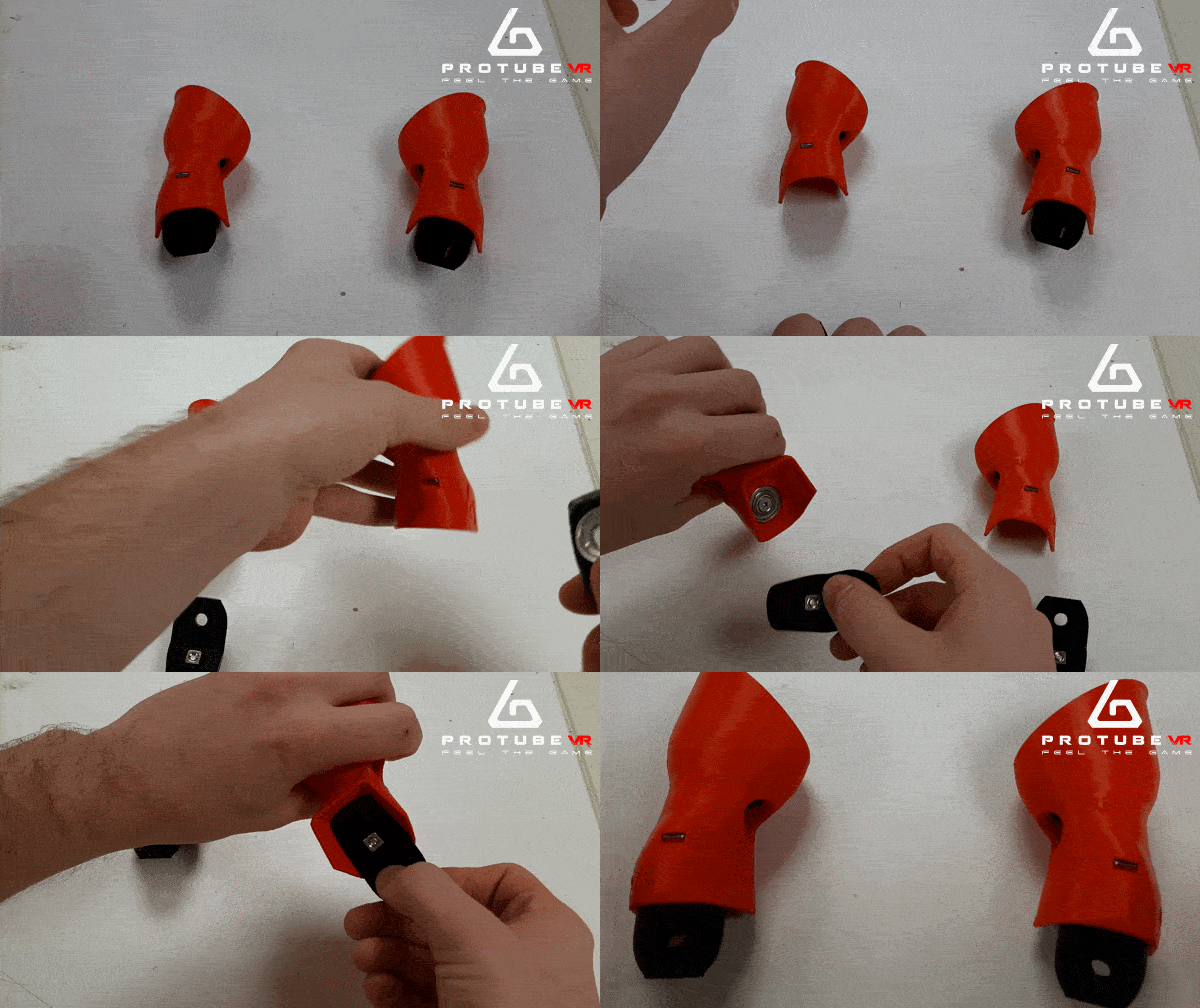
|
In the next steps, you will need the magnetic supports. They are usually magnetically attached to the cups. The magnets are quite strong when trying to detach them with hands, but do not be afraid of breaking them, they are made to resist this step. You just need a little force to separate them. |
|
STEP 2: REAR SIDE
________________________________________________________________________________________________________________________________________________
You will need: bag n°2, medium tube and notched magnetic bracket.
|
|
 |
 |
| 2.a – Apply some oil all around the notches on the T-notched connection. The mag support is usually attached to the MagCup. |
2.b – Put one O’ring on the 20mm screw, slot them both into the hole provided in the notched magnetic bracket. | 2.c – Then slide the previously oiled T-notched connection over the screw |
|
|
|
|
| 2.d – Put one O’ring on the 20mm screw, slot them both into the hole provided in the stock. | 2.e – Screw all the pieces together, taking care not to over tighten. You must be still able to rotate the two parts by force. | 2.f – Unscrew the 18mm screw at the base of the T-notched connection. You will need it at the step 2.l). |
|
|
|
|
| 2.g – Set the butterfly screw on the hex washer. (note to Tao: the arrow is a separate image) | 2.h – Screw the butterfly with the Hex screw to a nut on the other side |
2.i – Slide the medium tube into the T-notched connection.
Then place the external notched connections on both side of the tube. |
|
|
||
|
|
|
|
| 2.j – Finally screw the two external notched connections on the tube. | 2.k – Apply some oil all around the external notches of the rear side. |
2.l – Place one O’ring on the 18mm screw (the one from 2.f). Slide them both through the internal notched connection and the external connection. |


 |
 |
| 2.m – Attach the screw securing both connection with one O’ring and the nut. | 2.n – Screw all the pieces together taking care not to over tighten. You must be still able to rotate the two parts using force. |
STEP 3: FRONT SIDE
________________________________________________________________________________________________________________________________________________
You will need: bag n°3M, longer tube and smooth magnetic bracket.
|
|
 |
|
| 3.a – Apply a dot of oil on the base of the butterflies part and attach each butterfly with one Hex screw. |
3.b – Remove the 18mm screw on the T-notched connection. You will need it at step 3.j. Put the hex washers on the butterfly screws. Put one nut on the T-notched connection and one on the smooth magnetic bracket. |
The mag retainer is usually attached to the MagCup (cf. intro of instruction)
Then slot into the rubber washer. Then slot into the smooth magnetic bracket. Finally, secure with a nut. |
|
|
|
|
|
|
|
|
|
3.d – Slide the other butterfly screw through the T-notched connection on the none-logo side. Secure with the nut previously installed in 3.b. |
3.e – Put the previously assembled part through the longest tube.
|
3.f – Put the wedge on the ring and slide them through the stock of the tube. |
|
|
|
|
|
|
|
|
|
3.g – Put the connection with internal notches on the tube and screw it with the Hex key. |
3.h – Apply some oil around the internal notches. |
3.i – Place one O’ring and the nut on the internal notched connector. |


 |
 |
|
3.j – Place one O’ring on the 18mm screw previously removed from the T-notched connector (step 3.b). Slide them both through the external notched connection and the internal connection. Secure it with the nut on the other side. |
3.k – Screw all the pieces together taking care to not over tighten. You must be still able to rotate the two parts by force. |
STEP 4: ADJUSTMENTS
________________________________________________________________________________________________________________________________________________
|
|
|
|
| 4.a – Bend all the connections at an angle of 90° so that the MagTube Rifle almost forms a square. | 4.b – Adjust the medium tube with the top of the stock and tighten a bit more the screw from step 1.b. | 4.c – Adjust the long tube with the rear of the butt and tighten a bit more the screw from step 2.j. |


STEP 5: FINAL TOUCH
________________________________________________________________________________________________________________________________________________
You can magnetically attach the cups to the black magnetic holders.
Make sure the logo on the cups are facing the front of the Rifle.
Now, you can remove the wrist straps of your controllers and replace them with the ProTubeVR ones.
 |
Congratulations!
|